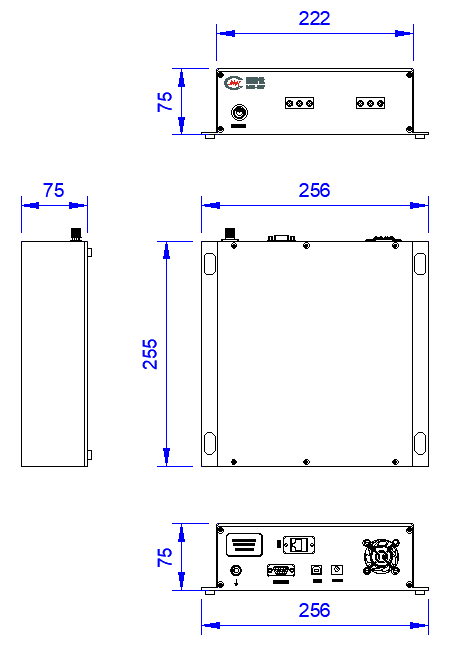
DC~40GHz, Two sets of SPDT, 2.92, RJ-45 Control, USB Control.
To check stock availability, search under "In-stock Products" on the Dianzibuy store.
Any change to the content of this page is subject to change without notice. Please confirm the specifications before ordering.
Products must not be used for any unlawful purpose; the customer bears any loss arising from unlawful use.
Broadband, high-power.
| Parameters | Min | Typical | Max | Units |
|---|---|---|---|---|
| Frequency | DC | ~ | 40 | GHz |
| IL | 0.4@DC-12GHz | dB | ||
| IL | 0.6@12-18GHz | dB | ||
| IL | 0.8@18-26.5GHz | dB | ||
| IL | 1@26.5-40GHz | dB | ||
| Isolation | 70@DC-12GHz | dB | ||
| Isolation | 60@12-18GHz | dB | ||
| Isolation | 55@18-26.5GHz | dB | ||
| Isolation | 50@26.5-40GHz | dB | ||
| VSWR | 1.5@DC-12GHz | |||
| VSWR | 1.8@18-26.5GHz | |||
| VSWR | 2@26.5-40GHz | |||
| Average power | 40@DC-6GHz | W | ||
| Average power | 30@6-12GHz | W | ||
| Average power | 25@12-18GHz | W | ||
| Average power | 12@18-26.5GHz | W | ||
| Average power | 5@26.5-40GHz | W |
| Switch time | 15ms |
| Switch way | Two sets of SPDT |
| Connector | 2.92 |
| Connector material | Stainless steel |
| Impedance | 50Ω |
| Working voltage | +12VDC |
| Operation Temp. | -25~+65℃ Design assurance |
| Storage Temp. | -40~+80℃ Design assurance |
| Switching Lifetime | 2 million Cycles |
| Control | RJ-45 Control, USB Control. |
| 1 | Branching port | J1,J2,J3,J4 |
|---|---|---|
| 2 | Common port | JC1,JC2 |
| The name of the command | Feature description | Command format | Command direction | Successful response | Failure response |
|---|---|---|---|---|---|
| Switch queries | Switch status query | ReadSW:01 | PC-->Switch | SW:01,V1 , V2 ,END | Fail |
| Switch settings | Switch settings | SetSW:01,K01,XX | Switch --> PC | OK | Fail |
| Model inquiry | Get the device model | *IDN? | PC-->Switch | XXXXXX, RENEW, SN123456789, SV004 | Fail |
| Device model settings | Device model settings | SET IDN:model | Switch --> PC | OK | Fail |
| Network interface setting command | Change the IP address, default gateway, subnet mask, and port number at the same time | SetNETWORK:Address-Gateway-Mask-Port Number | PC-->Switch | OK | Fail |
| Network interface query command | Query the IP address, default gateway, subnet mask, and port number at the same time | LstNETWORK | PC-->Switch | IP:address-NETGATE:gateway-NETMASK:mask-PORT:Port number | Fail |
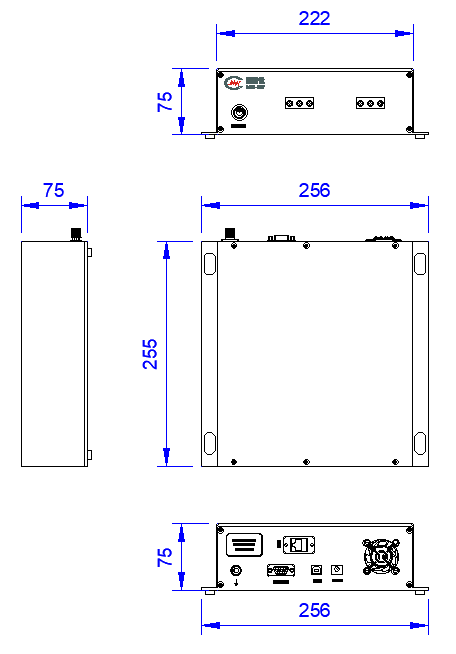
1、The device defaults as a TCP/ip server;
2、Default IP address: 192.168.1.100;
3、Default port number: 3000;
4、Baud rate: 9600
| The name of the command | Feature description | Command format | Command direction | Successful response | Failure response |
|---|---|---|---|---|---|
| IP Query commands | Query the IP address of the switch control board | LstIP | PC-->Switch | IP:address | Fail |
| Subnet mask setting command | Modify the subnet mask of the switch board | SetNetMask:parameter | PC-->Switch | OK | Fail |
| Subnet mask query command | Query the subnet mask of the switch control board | LstNetMask | PC-->Switch | NetMask:Subnet mask | Fail |
| Default gateway setup command | Modify the IP address of the switch board | SetNetGate:Default gateway | PC-->Switch | OK | Fail |
| The default gateway query command | Query the default gateway of the switch dashboard | LstNetGate | PC-->Switch | NetGate:Default gateway | Fail |
| Port number setting command | Modify the port number of the switch control board | SetPORT:parameter1 | PC-->Switch | Disconnect from the network | SetPORTFail |
| Port number query command | Query the port number of the switch control board | LstPORT | PC-->Switch | The PORT address isPort number | None |
| IP Set commands | Modify the IP address of the switch board | SetIP:address | PC-->Switch | OK | Fail |
| 1 | Clean the surface of the product, do not soak the product in cleaning solution for cleaning. |
| 2 | If the temperature is higher than 125℃, consult with us before ordering. |
Send us your requirements — our engineers will respond within one working day.